Just because a product is somewhere in your store doesn’t mean a customer can buy it easily. It could still be in the stockroom, sitting on an unsorted cart, hidden behind the wrong shelf tag, or left out of a promotion that launched that morning.
According to IHL Group’s 2025 Inventory Distortion Study, out-of-stocks cost retailers $1.16 trillion globally each year, with empty shelves alone accounting for $690.9 billion in lost sales.
Customers also see well-stocked shelves as a sign that your store is being run properly. It helps them find what they need and gives your employees a clear standard to follow.
Basically, efficient retail stocking procedures help teams get the right products onto shelves at the right time. When every brands follows the same standard for retail operations, stocking becomes easier to manage and verify.
In this blog, we’ll walk you through five actionable steps to streamline your retail stocking procedure, ensuring shelves are always stocked with the right products at the right time.
Five Steps for More Efficient Retail Stocking
1. Prioritize products using demand and availability signals
Start each shift with a clear order of work. High-turnover products need attention because they can create the most visible gaps when unavailable. Promoted products, seasonal items, perishables, and products advertised online also need priority because customers arrive expecting to find them.
Use sales and inventory data to build the priority list and confirm it with a physical shelf check, since a system count doesn't show whether the item is in the right location, easy to reach, correctly priced, and ready to buy.
A practical priority sequence is:
-
Time-sensitive products such as chilled, frozen, or fresh goods.
-
Promoted items, endcaps, and products featured in current campaigns.
-
High-turnover SKUs (Stock Keeping Unit) and known out-of-stocks.
-
Items with low shelf capacity that need more frequent replenishment.
-
Shelf-stable, slower-moving products.
A digital checklist can simplify this process by setting automated tasks that notify staff when these products need attention. This ensures popular items are continuously restocked, helping you avoid empty shelves and keeping high-turnover products always available.
Other tips: By using retail innovations like smart shelves and digital displays, retailers also have the option to adjust to competitor pricing and stock levels in real-time, adopting dynamic pricing like in e-commerce.
2. Set Up Clear Restocking Procedures
A shelf stocking procedure should be specific enough that a new employee can follow it and experienced employees don't have to reconstruct the process from memory. Define what happens, who owns it, what evidence is required, and what to do when something doesn't match.
|
Stage
|
Required action
|
|
Receive and verify
|
Match the delivery to the purchase order or transfer, record shortages or damage, and update the inventory system promptly.
|
|
Stage and sort
|
Separate time-sensitive items, group cases by department or aisle, and load carts in the order staff will work the floor.
|
|
Transport safely
|
Use suitable carts or equipment, keep customer paths clear, and avoid leaving unstable cases or packaging in the aisle.
|
|
Match and place
|
Confirm the SKU (Stock Keeping Unit) or UPC (Universal Product Code) against the shelf tag, fill the correct location to the approved capacity, and keep adjacent facings intact.
|
|
Rotate and inspect
|
Move older dated stock forward, place newer stock behind it, and remove damaged, expired, recalled, or unsellable items.
|
|
Face and clean
|
Pull products forward, turn labels toward the customer, remove packaging, and leave the shelf and aisle customer-ready.
|
|
Audit and close
|
Check gaps, tags, prices, planogram position, overstock, and unresolved exceptions, then update task status and inventory records as required.
|
The checklist should live where work happens. A well-built SOP checklist can assign ownership, show instructions or reference images, capture a reason for non-compliance, and trigger the correct follow-up without asking staff to leave the aisle and find a binder.
Purpose-built digital retail stocking checklists can also apply acceptable quantity ranges, schedule checks by location or daypart, and make incomplete work visible to the next shift.
3. Build FIFO, planogram compliance, and safety into the routine
For dated products, use first in, first out (FIFO): inspect the existing stock, remove anything that shouldn't be sold, pull older product forward, and place newer product behind it. Follow your category-specific handling, temperature, recall, and date-label policies. For apparel, hard goods, and other non-dated categories, use the same rotation mindset to catch damaged packaging, obsolete versions, and neglected backstock.
Next, compare the finished shelf with its approved layout. Strong planogram compliance makes the shelf easier for customers to shop and gives staff a reliable visual standard for product location, facings, shelf capacity, signage, and promotional placement.
Finish with a safety and compliance scan that confirms cartons, wrap, tools, carts, and equipment are out of customer paths and that heavy or unstable items are stored securely within the limits of the shelving. Employees should follow the lifting, equipment, aisle-clearance, and storage rules in the retailer’s current safety program.
Use the same documented discipline described in our guide to retail floor safety, where scheduled checks, clear evidence, and immediate corrective actions give managers a consistent way to address risks across every location.
4. Assign ownership, checkpoints, and exception actions
“Everyone watches the shelves” sounds collaborative, but it leaves too much room for assumptions. Define who completes the check, who approves exceptions, and who is alerted when a critical product or promotion can't be corrected immediately.
A simple operating rhythm works for many stores:
-
Opening: confirm promoted items, high-turnover SKUs, obvious gaps, shelf condition, and overnight carryover.
-
Midday or after peak traffic: replenish fast movers, recover high-traffic areas, and address exceptions from the morning.
-
Closing: prepare priority zones for the next day, record unresolved gaps, and hand off actions with an owner and due time.
Customer questions, price checks, spills, and service calls will interrupt stocking. The retail stocking procedure needs to preserve where the employee stopped and what remains to be done
You also need to define exception actions in advance. When an item can't be filled, staff should record whether it is truly out of stock, present in another location, waiting in backstock, misplaced, damaged, recalled, or affected by an inventory-count error.
Clear exception rules become easier to manage when smart audit workflows route failed or low-scoring checks to the people who can review them and assign the next action.
Want to measure your retail stocking standards across multiple stores?
The right mystery shopping program can reveal whether products are actually available, easy to locate, correctly presented, and supported by staff when a real shopper arrives.
5. Analyze Sales Data and Inventory Trends
By using real-time sales data, you can quickly identify fast-selling products and prioritize their restocking to prevent empty shelves.
Looking at historical insights can also help anticipate busy seasons, such as holidays. This allows you to adjust stocking practices in advance, so that you have enough popular items in stock.
Additionally, keeping track of slow-moving inventory helps prevent overstocking. By identifying items that aren’t selling well, you can focus on the products that truly matter to your customers, ensuring a more efficient stocking process overall.
Managers can also use random spot checks for quality assurance to review a sample of routine submissions and confirm that stocking standards are being applied consistently without adding a manual review step to every completed checklist.
Build a smarter retail stocking procedure with IntouchCheck®
IntouchCheck® is a powerful digital checklist and inspection software/app designed to enhance your retail stocking processes, ensuring that your store operates smoothly.
-
Create unlimited checklists for retail stocking inspections of core products.
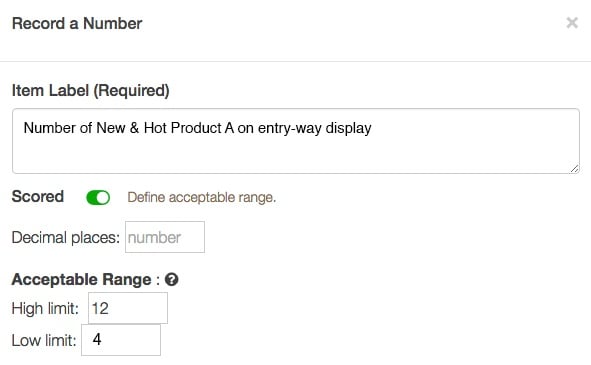
You can create new checklists for seasonal items, or edit and adjust checks as products and merchandise change. Set acceptable number ranges to verify the correct number of items that should be available for customers. This will instantly flag problems if the correct number of products isn't available.
-
Use scheduling reminders and incomplete check reports
With IntouchCheck® you can set complex schedules, automated reminders, and view reports on incomplete audits/checks, so your entire team can stay on top of important inventory checks.
-
Flag low stocked product to generate restock action plans
Teams can flag any issues they find in the store and create action plan reminders of items they need to restock. These to-do items can be made available for the entire team, so when an employee is looking for something to do, they can access a list of items to restock and mark them as resolved once complete.
Keep every shelf ready for your next customer. Request a Free Demo of IntouchCheck® Below↓

 Sarah Beckett


 Sarah Beckett : September 10, 2024